AUTO hunt and AUTO quest
What the AUTO button does, how to switch it on, off and pause it, how it picks targets and walks round walls, how it hunts a quest to the end, plays NPC quests, travels across maps and buys what the way needs.
On this page
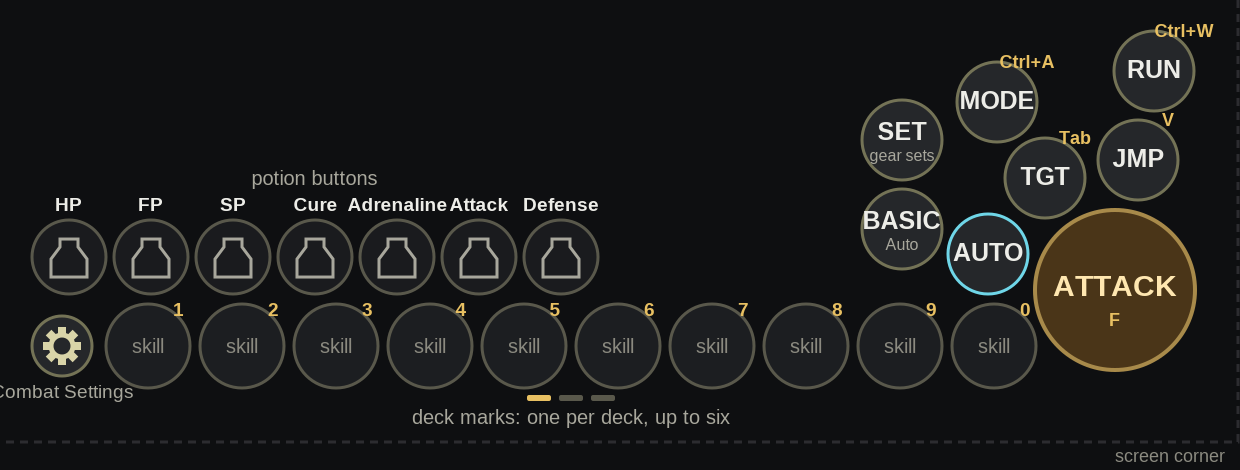
Press AUTO and your character fights by itself: it picks monsters, walks to them, attacks with the skills you marked, keeps your buffs up, drinks potions and picks up the drops. Tap a quest in your quest list instead and it walks to the quest's monsters, wherever they live, and hunts until the count is full.
Everything AUTO does, you can do by hand. Every attack, door and purchase it makes passes the same checks as yours.
What AUTO does
- Fights. The monster you selected first, then monsters that attack you, then the others in your Target order.
- Uses your skills. Only the skills, forces and buffs that carry the AUTO mark.
- Keeps your buffs up, and drinks potions by your Auto Potion page.
- Picks up drops (all, quest items only, or none).
- Walks the real way to a monster: down a ramp, round a wall, up to 60 m of route.
- Never attacks through a wall.
- Hunts a tapped quest to the end, and with AUTO on plays NPC quests too (see AUTO quest).
- Travels across maps, through portals, and buys the stones, tickets and scrolls the way needs (see Auto-go).
- Fights in the Chip War and hunts a boss from the boss list (below).
- Gets off a mount before it fights.
When the bag is full it leaves the drops and says so once:
Shown in the gameAuto-hunt: the bag is full. Items are left on the ground.
Switching it on, off and pausing
| You do | AUTO |
|---|---|
| Press AUTO | on: "Auto-hunt on." It hunts here and never walks off to a quest. |
| Tap a quest in the quest list | walks to the quest, switches on and hunts that quest to the end |
| Tap the same quest row again | stops and switches off (two taps within 0.6 s count as one) |
| Press a movement key (W A S D, the arrows) | off |
| Use the phone's stick or click the ground | only pauses, and carries on 0.6 s after you let go |
| Press Find Merchant, or "Go to" on the boss list | off |
| Die | off, unless Auto-Return When Resurrected is on |
| Your own Chip War target goes down | off: "Your target ... is down." |
| Board a MAU | AUTO and its gear are hidden |
If the AUTO button is faint, AUTO is switched off on the server you play on:
Shown in the gameAuto-hunt is switched off on this server.
The AUTO mark
AUTO uses only the skills that carry its mark. Every tile of the skill bar has one.
- PC: click the small A in the corner of a skill tile. It lights when the mark is on.
- Phone, and the New skill bar: hold AUTO for 0.5 seconds. This is setup mode. Tap each skill to switch its mark (a small blue dot shows it is on).
- Finish. Tap AUTO, or wait 8 seconds.
Shown in the gameTap a skill to switch AUTO for it. Tap AUTO to finish.
- A skill you put on the bar by hand starts marked when AUTO can use it.
- Never offered the mark (AUTO will not press them): Detonate, Escape, Return Gate, Hide, Cloaking, Silent Step, Force Freezing, Feign Death, the guard tower and trap skills, the cloak's Booster, and short buffs of under 60 seconds (Acceleration, Sprint, Scamper, Barrier, Blink Illusion). AUTO never casts a debuff or a heal and never summons an animus.
Shown in the gameAuto-hunt cannot use this one.
- In siege mode AUTO uses only the siege kit's skill (Compound Siege or Chain Rocket).
- A launcher has no attack skill before its class has one: AUTO uses the normal attack only.
RECOMMEND
In setup mode the gear disc becomes RECOMMEND. It fills your empty tiles and marks them:
- up to 6 attacks, your strongest, one per cooldown group, for the weapon in your hand. "Strongest" means the attack's damage from the game's tables, raised by your skill level and mastery;
- up to 6 buffs: class buffs first, then your weapon line's skill buffs, then force buffs.
It never writes over a tile you filled. When there is no room it says how many did not fit and asks you to clear some tiles; when there is nothing to add:
Shown in the gameNothing to add.
How AUTO uses skills
Buffs
- A marked buff is cast when it is missing or has 9 % of its time or less left.
- At most 6 marked buffs are kept up, so two of your eight buff places stay free for a friend's buffs.
- Between fights, missing buffs go on before the next monster.
Attacks: Normal or Always
The Skill Frequency row of Combat Settings decides how AUTO mixes skills and the normal attack:
| Skill Frequency | How AUTO fights |
|---|---|
| Normal (the default) | the normal attack runs; marked attacks are pressed when ready. No attack skill that would take your FP under 20 %; buffs and the normal attack still go on. |
| Always | skills first: every marked attack is cast before the normal attack, which only fills in while they are all cooling down |
Shown in the gameSkill Frequency Always: AUTO casts every marked attack skill first. The normal attack only fills in while they are all cooling down.
With Always, a fight opens with a skill that is ready or will be within 1.0 s. No normal swing goes out while a marked attack is ready, and swings stop 1.1 s before one comes ready. If a cast is refused as too early three times in a row, or for 2.5 s, the normal attack is let go for 1.2 s.
With AUTO Uses Basic Attack OFF, or a staff in your hand and an attack marked, AUTO fights with skills alone.
How AUTO chooses a target
- The monster you selected yourself, before or while AUTO runs. Select another and it switches at once.
- A monster hitting you (with Attack Back When Hit on, the default).
- The tapped quest's monster; then the party leader's target (with Party Target Sharing on); then the nearest by your Target page order.
How far it goes for one:
- The quest's monster, a monster you can see, or the one already engaged: walked to by the real route, up to 60 m.
- A monster that is not the quest's and that you cannot see: only up to 15 m and on your own floor. So AUTO does not leave a cave for a monster behind its wall.
- A target once engaged is kept until it is down.
- Auto-Combat Range limits how far from the hunting spot it looks (20 m, 40 m, Unlimited or Off). Out of range it walks back to half the range. See Combat Settings.
When a quest's monster is not there, AUTO waits at a quiet spot near its area and attacks it when it appears.
AUTO quest
- Tap a kill or collect quest in the quest list (under the map name).
- The character walks there, through portals and across maps, to the quest's monster area.
- AUTO switches on and hunts that quest until its count is full. It does so with any Auto-Combat Range: with Off, it hunts only the quest's monsters.
- Tap the same row again to stop.
- A quest that wants one monster in one spawn area keeps AUTO in that area until the objective is done.
- Collect quests: the game names a monster that drops the item, one on your map that fits your level first, or one on another map when every dropper here is more than 3 levels above you. With none:
Shown in the gameNo monster that drops this quest's item could be found.
Auto-play of NPC quests
For NPC steps (talk, bring, look around) a tap walks to the NPC and opens his menu. With AUTO on, auto-play goes further: it takes the NPC's quest, presses OK through the pages, presses "Conversation", hands over quest items only and says so, takes the reward and the next quest.
Auto-play never does these for you:
- choose a reward (the "Select your reward" window waits for you);
- take a quest with a time limit: "Auto-play: ... has a time limit of ... min. Pick it yourself.";
- give an item that is not a quest item: "... is not a quest item. Press Conversation at ... yourself.";
- take a sixth NPC quest: "Auto-play: you hold 5 NPC quests, the most allowed."
More on quests: Quests and the quest list.
Auto-go: travelling by itself
The character walks by itself, through portals to other maps, when you:
- pin a spot on the big map and press Move;
- tap a quest, or an NPC row under "quests I can take now";
- press "Go to" on the boss list, or "Go to leader" in a party.
Shown in the gameFinding the way...
Shown in the gameNo way found. Auto-move stopped.
Shown in the gameCannot go there. Going to the nearest place.
On the way to a ship it waits at the dock and on board (see Ether and the transport ship). A town scroll already in your bag is used when it saves map changes: lock its bag slot to keep it.
Auto-buy travel items
System > Game > Convenience > Auto-buy travel items (On by default): on any auto-move the game uses, or walks to an NPC and buys, the stones, ship tickets and town scrolls the way needs. It never buys a cash scroll or a spare scroll.
| Row | Choices | Default |
|---|---|---|
| Auto-buy travel items | On / Off | On |
| Keep at least (Dalant) | 0, 50,000, 100,000, 500,000, 1,000,000, 5,000,000 | 100,000 |
| Keep at least (Gold) | 0, 20, 100, 500 | 0 |
| Most to pay for one item (Dalant) | 50,000, 300,000, 1,000,000, 3,000,000, 20,000,000 | 3,000,000 |
| Spare stones | 0, 1, 2, 3, 5 | 1 |
Stones cost Gold. When a purchase is not made, the line says why, for example:
Shown in the gameAuto-buy stopped: the bag is full.
AUTO in the Chip War
During the Chip War's battle:
- A target you pick (a chip, the Keeper, a tower, a trap, a player or a monster) is attacked with your marked skills and nothing else. When it is down AUTO switches off.
- With nothing picked, AUTO attacks an enemy chip or the Keeper within 18 m that can be damaged, ahead of ordinary monsters. A monster hitting you still comes first.
- AUTO never picks a player, a tower or a trap by itself. With Auto-Combat Range Off it picks no chip either.
Boss hunt
On the boss list, Auto hunt (beside "Go to" and "Show on map") sends AUTO to the boss. It travels there and fights it. If the boss is dead, it waits 9 m short of its tomb, shows the countdown, and fights when the boss returns. Moving, dying, changing map or choosing a quest ends it:
Shown in the gameBoss hunt ended (you moved).
The boss list itself: Bosses.
Tips
Related: Combat Settings, Quests, Potions, Death and revival.