Controls on PC and phone
Every key on a PC, the mouse and the camera, the round on-screen buttons that PC and phone share, the ten-skill deck, and the chat words every player can type.
On this page
R4 Online has one control layout for a PC and a phone: round buttons around a big ATTACK button at the bottom right, and a row of ten skills. On a PC every button also has a key. This page lists them all. The phone version is still being made.
The keyboard
A key does nothing while you type in the chat line or a text box. A key you bind to a skill slot yourself takes over from the key's own job.
Moving and fighting
| Key | Does |
|---|---|
| W A S D or the arrow keys | Walk. Forward is away from the camera |
| Ctrl+W | Walk or run (the RUN button) |
| V | Jump (the JMP button) |
| Ctrl+A | Peace Mode or Combat Mode (the MODE button). In peace mode your weapon is hidden |
| F | Attack the selected target (the ATTACK button). If a skill set for AUTO is ready, the press uses that skill first |
| Tab | The next target, or the target list: the Target page of Combat Settings decides which |
| 1 2 3 4 5 6 7 8 9 0 | The ten skills of the skill deck shown |
| Space | Pick up the nearest dropped item; walks to one within 6 m |
Windows
| Key | Opens |
|---|---|
| Esc | The Game Menu. With a window open, Esc closes the top window first |
| Enter | The chat line; Enter again sends, Esc cancels |
| C or Ctrl+C | Character information |
| I or Ctrl+I | The character and equipment page, with the bag |
| M | The map of the place you are in |
| R | The radar (minimap), on or off |
| Ctrl+J | The quest journal |
| Ctrl+P | The party window, in a party |
| Ctrl+G | The guild window |
| Ctrl+U | The Summoner window (Cora animus) |
The animus (Cora)
With an animus out: , it attacks your target, . it attacks, / it follows you. See Holy Alliance Cora.
Answers, camera and screen
| Key | Does |
|---|---|
| Y / N | Answer Yes or No to the Chip War's question "move to the mine?" while it is on screen |
| F6 | The next camera view |
| Alt+1 to Alt+5 | One of five camera views |
| Shift+F6 | Camera follow on or off |
| F7 | Step through the graphics quality settings |
| F11 | Window or full screen; the game remembers your choice |
The mouse and the camera
- Left click on the ground: walk there.
- Left click on a monster: select it. A second click does not attack: press F or ATTACK.
- Right button held and dragged: turn the camera.
- Wheel: zoom in and out.
- Middle click: look behind you.
- Right click on a skill tile: set its key.
Mouse Sensitivity and Camera Shake are rows of the System window: see The screen and windows.
The on-screen buttons
The same buttons stand on a PC and a phone. On a PC each shows its key.
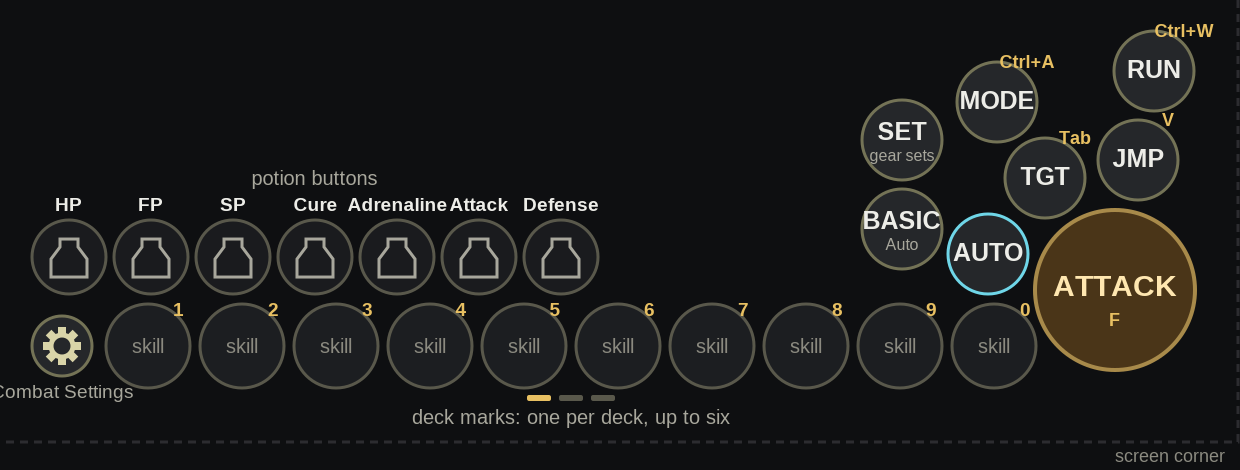
| Button | Where | Does | PC key |
|---|---|---|---|
| ATTACK | Bottom right, the big one | Attack the selected target | F |
| JMP | Up the right edge | Jump | V |
| RUN | Up the right edge | Walk or run | Ctrl+W |
| TGT | Around ATTACK | The next target | Tab |
| MODE | Around ATTACK | Peace or combat mode | Ctrl+A |
| AUTO | Around ATTACK | AUTO hunt on or off | - |
| BASIC | Around ATTACK | Basic attack: Auto or Manual | - |
- The skill row: ten skill discs ending under ATTACK, with a gear button at its end that opens Combat Settings.
- The potion row: HP, FP and SP potion buttons in a short row above the skills.
- The move stick: works on a PC too. Drag it with the mouse; W A S D move its knob. System, Options, Graphics, Move Stick on PC: Always (the default), Only When Used, or Never.
The skill deck
- A deck holds ten skills, on 1 to 0. Out of the box you have three decks to fill; the row slides between them.
- System, Game, Convenience, Skill bar: New, "a row of ten round skills that slides between decks", or Classic, the square belt.
- While you ride a MAU, the buttons turn into the MAU's cockpit.
Chat words
Press Enter, type, press Enter. A line with no word in front is normal chat for the players near you.
| Type | Does |
|---|---|
| /w name text (or /whisper) | Whisper to one player, on any map. With a name and no text it opens a conversation |
| /r text | Answer the last player who whispered to you |
| /party text | Your party, on any map |
| /guild text | Your whole guild, on any map |
| /council text | Your guild's master and council members only |
| /race text (or /nation) | Race chat, read by your whole nation. Only the nine council seat holders may write in it |
| /archon text | Council chat: the council seat holders of your nation |
| /rep text | The council seat holders and the guild masters of your nation |
| /Greeting and other gestures | Your character plays a gesture |
Gestures
Stand still, alive and not riding, then type a slash and the gesture's name.
- Every nation: Greeting, Salute, Hand_Waiving, Hand_Motion, Clapping, Crying, Laughing, Cheering, Provocation, Help, Stop, Pointing_Out, Dash, Spirit, Battle_cry.
- Bellato: Cold, Hot, Love; men also Die and Push-up, women Pretty and Scary.
- Cora: Arduousness, Ceremony, Telephone; men also Outsider and Begging, women Sexy and Shower.
- Accretia: Angry, Stretching, Sleepy, Baseball, Observe.
The Character Action board shows the same gestures; a double click plays one.