Make your character
Step by step from the lobby's + to your new character on its stand – nation, line, the final class you will keep, its skills with a live preview, the look, the starting gear and the name rules.
On this page
In R4 Online you pick your final class when you make the character. There are no class promotions to walk to later: a new Berserker is a Berserker from level 1, with every class skill of his path. So the class you click here is the class you play. The create screens let you read and watch each class's skills before you decide.
The steps at a glance
- Press + on an empty slot. The lobby's right edge; see The character lobby.
- Pick a nation. The tabs at the top: Bellato, Cora, Accretia.
- Pick a line. Warrior, Ranger, Mystic or Specialist, on the right. Accretia has no Mystic line.
- Pick the final class under the line. If it shows Skill set chips, pick one of the two.
- Read and watch its skills. Tap an icon to read its card; press Play to see the character use it.
- Press Select. The Customize screen: outfit, hair, face, male or female. The starting gear is listed on the right.
- Press Create character. Type a name and press Confirm. You are back in the lobby with the new character on its stand.
1. Select Class
Nation and line
The three tabs at the top pick the nation. The four buttons on the right pick the line, the family of classes:
| Line | How it fights | Bellato | Cora | Accretia |
|---|---|---|---|---|
| Warrior | Close combat with a sword, axe, mace or spear: a two-handed weapon, or one hand and a shield | 3 | 3 | 3 |
| Ranger | Ranged combat with bows, guns and throwing weapons; Accretia also launchers | 3 | 3 | 3 |
| Mystic | Force spells, cast with a staff in the hand | 3 | 3 | 0 |
| Specialist | Support: revives, defence gauge repair, guard towers; Bellato's MAU pilot | 2 | 1 | 2 |
The final classes
| Warrior | Ranger | Mystic | Specialist | |
|---|---|---|---|---|
 Bellato | Berserker, Warden, Sentinel | Sniper, Harrier, Saboteur | ArchMage, Chronomancer, Soul Chandra | Machinist, Armor Driver |
 Cora | Zealot, Paladin, Templar | Marksman, Sleeper, Redeemer | ArchMagus, Reave, Faust | Artisan |
 Accretia | Punisher, Dreadnought, Warder | Annihilator, Desolator, Infiltrator | - | Scientist, Battle Leader |
When you click a class, the left side shows its name, a line such as "Bellato Warrior line, final class from level 1", and its class skills as icons: 2 to 8, depending on the class. A class with a special right shows a tag: MAU for the Armor Driver, Summoning for the classes that summon an animus.
Skill sets: the eight two-way classes
Eight classes can be reached by two paths. For them the screen shows two Skill set chips. The chip decides which first-promotion skills the class holds, and for some classes more:
| Class | Skill sets | What else the choice changes |
|---|---|---|
| Warden | Myrmidon or Sentry | The level-30 reward: a weapon of your choice, or a shield |
| Harrier | Vigilante or Sharpshooter | Traps: none, or up to 10 |
| Chronomancer | Mage or Candra | Only the skills |
| Paladin | Crusader or Knight | The level-30 reward: a weapon of your choice, or a shield |
| Sleeper | Archer or Hunter | Traps: none, or up to 10 |
| Reave | Magus or Summoner | The animus: no, or yes, with a first animus as the level-30 reward |
| Dreadnought | Destroyer or Gladius | The level-30 reward: a weapon of your choice, or a shield |
| Desolator | Gunner or Scout | Traps: none, or up to 10 |
The skill card
Tap a skill icon. Its card replaces the class text and shows:
- the skill's name and kind: Attack, Buff, Debuff or Passive,
- the game's own description of the skill,
- the cost (HP, FP or SP) and the Cast Delay,
- one line on whether a level 1 character can use it.
The level-1 line is the useful part. It says one of these:
| The card says | What it means |
|---|---|
| Usable at level 1. | You can use it from your first minute |
| Usable at level 1 with a Mace – not with the starter Training Sword. | It needs another weapon than the one you start with (here a mace) |
| Not at level 1: needs FP 90, a level 1 Sentinel has 45. | Your FP is too small for it at level 1; it grows with your masteries |
| Not at level 1: needs a Throwing weapon, and the first one asks level 5. | The weapon it needs cannot be worn before level 5 |
| Required Level 30 | One of the 28 class skills held back until level 30 |
| Not usable yet on this server. | The game refuses it today (party heals, return gates and two others) |
| Needs an animus. | A summoner skill: it works with an animus out |
| Always on. | A passive skill |
| Only against an enemy player. | It cannot be used on monsters |
| In siege mode only. | An Accretia siege skill |
| Comes with the Sentry skill set. | It belongs to the other skill set of this class |
The card prints no duration. The class pages of this guide give every skill's cost, cooldown and duration.
Play: watch the skill
Press Play at the foot of the card. The character on the stand performs the skill with its real motion, weapon, effect and sound. Nothing is sent to the game's world: it is only a preview. Press another icon, or turn the character, and it stops.
- 45 of the 201 skill icons say "No preview for this skill": passives, siege skills, animus skills, and attacks that only a bow, a gun, a throwing weapon or a launcher can use.
- A skill that needs another weapon borrows one for the preview. Judgment takes a Training Club, then gives the sword back.
2. Customize
Press Select. The Customize screen has these parts:
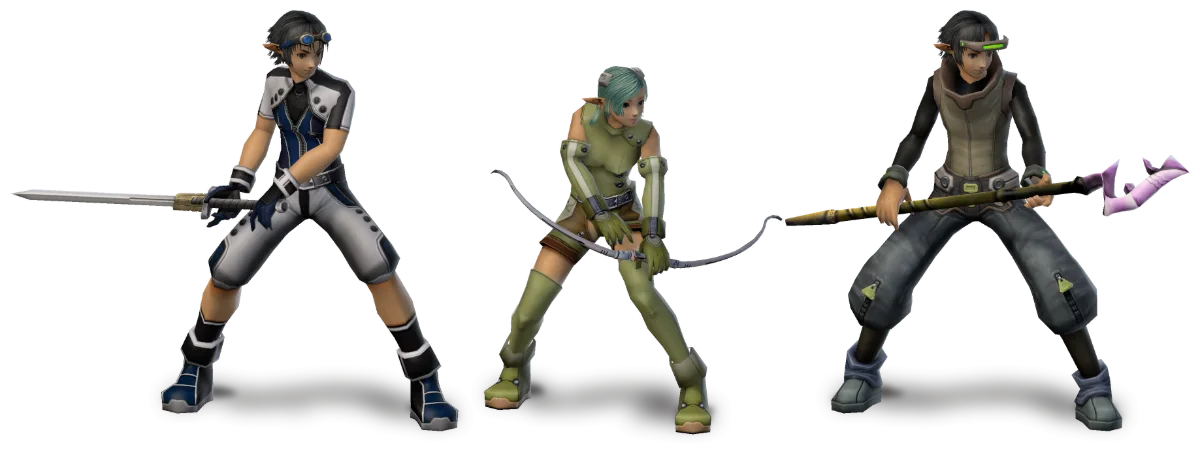
- Outfit: three starting outfits for your line; the first is picked unless you change it. The outfit you pick is yours and worn from the first login. An outfit is a look only:
Shown in the gameThe outfit is the look. The gear under it gives the numbers.
- Hair (Style 1 to 4), Face (Face 1 to 4) and Male or Female: Bellato and Cora only.
- Accretia has one machine body: no sex, no hair, no face. Only the outfit is chosen.
- Tools at the top right: an eye that hides everything but the character, face the front, Undo and Redo.
Starting gear
On the right, Starting gear lists the kit your character will wear: WEAPON, AMMO (Rangers and Specialists), HELMET, UPPER, LOWER, GLOVES, SHOES, each tagged Worn at start, and a BAG row: "4 potion stacks, 10 return scrolls". The kit by nation and line is in Your first hour.
3. The name
Press Create character. A band opens across the dimmed screen with a text line, Cancel and Confirm:
Shown in the gamePlease enter 1 to 16 letters, digits or _.
A refused name is said inside the box with its cause, and the box stays open for another try:
| You typed | The game says |
|---|---|
| A name in use | "That character name already exists" |
| A space or another sign | "(… is not allowed: only A-Z, a-z, 0-9 and _)" |
| 17 characters or more | "A name is at most 16 characters." |
| On a slot that is taken | "That slot already has a character." |
Esc closes the name box and keeps you on Customize. A good name takes you back to the lobby, where your new character stands holding its Training weapon. Press Start game to enter: see Your first hour.
What the create screens do not ask
- No stats to roll and no points to spend. HP, FP and SP come from your level, your masteries and your class path.
- No promotions later. The path from starting class to final class is written when you make the character.
- No mastery choice. Every character has its mastery skills from the start; at level 1 only their Basic tier can be used.
How to choose
More on each nation: The three nations. Every class and how class skills work: Classes and skills.